Unflash: A Script Font That Elevates Digital Branding
Recently, I was working on a boutique online store’s homepage redesign. The client wanted something that felt personal, elegant, and modern—something that would stand out in a crowded market. After testing several fonts, I stumbled upon Unflash, a script typeface that immediately caught my eye. It wasn’t just visually appealing; it had a personality that aligned perfectly with the brand’s vision.
A Script Font with Purpose
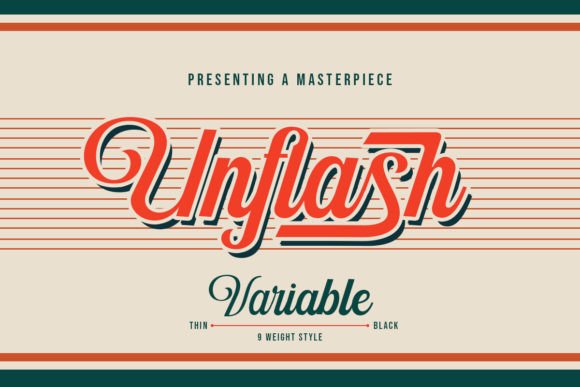
Unflash is a curve that carefully crafted and balanced script typeface. Its design feels both refined and expressive, making it ideal for creative projects where visual storytelling matters. The font has a fluid, organic feel, yet maintains enough structure to remain legible even at smaller sizes. This balance makes it versatile for a variety of digital applications—from headers to call-to-action buttons.
I first tested Unflash in the hero section of the boutique’s homepage. Placed over a high-quality image of their products, the font added a touch of sophistication without overwhelming the content. The subtle curves and consistent spacing made it easy to read, even when used in bold or italic variations. It worked well with both light and dark backgrounds, which is crucial for responsive design.
Where to Use Unflash in Web Design
Unflash shines in areas where a bit of flair can make a big impact. Here are some practical use cases:
- Hero Sections: As I used it, Unflash helped create a strong first impression. It’s perfect for titles that need to grab attention without being too flashy.
- Landing Pages: Whether it’s a course sales page or a product landing page, Unflash adds a touch of elegance to headlines and subheadings.
- Call-to-Action Buttons: The font’s clean curves make it ideal for CTA buttons, especially when paired with a contrasting color.
- Logos and Badges: Unflash can be used as a logo font or for decorative badges that add character to a website.
- Blog Headers: For bloggers looking to elevate their site’s aesthetic, Unflash offers a stylish alternative to standard sans-serif fonts.
Its versatility also extends to packaging design, social media graphics, and even editorial layouts. It’s not just a display font—it’s a tool that can enhance brand identity across multiple platforms.
Readability Matters
As a web designer, I know that readability is key. While Unflash is beautiful, I had to ensure it wouldn’t compromise user experience. I tested it on mobile devices, small buttons, and image overlays to see how it performed under different conditions.
On mobile screens, Unflash remains legible when used in larger sizes. However, I recommend using it sparingly in body copy. It’s better suited for headings, titles, and accents rather than long paragraphs. Pairing it with a clean sans-serif font like Helvetica Neue or Open Sans helps maintain clarity while adding visual interest.
When placed over images, Unflash works best when there’s sufficient contrast. I found that using a white or light-colored text on dark backgrounds made the font stand out more effectively. For light backgrounds, a darker shade like navy blue or black ensured the text remained readable.
Font Pairing Tips
Font pairing is an essential part of any design project. Unflash pairs well with both serif and sans-serif fonts, depending on the desired mood. For a more editorial feel, I paired it with a classic serif font like Garamond. For a modern, clean look, I used it alongside Roboto or Inter.
It’s also important to consider the weight and style variations included in the font family. Unflash offers several weights, from light to bold, which allows for greater flexibility in creating visual hierarchy. Including alternate styles like italic or condensed versions can further enhance the design.
Considerations Before Using Unflash
Before integrating Unflash into a live project, I made sure to check the following:
- Webfont Availability: Ensuring the font is available as a webfont is crucial for fast loading times and cross-browser compatibility.
- File Formats: Checking if the font supports common file formats like WOFF, WOFF2, and TTF ensures it works across all platforms.
- Commercial Licensing: Since this is a premium font, confirming its commercial use rights is essential for client projects and online stores.
- Responsive Design: Testing the font across different screen sizes and device types helps ensure a consistent user experience.
- Multilingual Support: If the website targets international audiences, verifying multilingual support is a must.
By taking these steps, I was able to confidently implement Unflash into the boutique’s homepage, knowing it would enhance both the aesthetics and functionality of the site.
Final Thoughts
Unflash is more than just a font—it’s a design asset that can elevate a brand’s digital presence. Whether you’re building a portfolio site, a course sales page, or a campaign landing page, this script typeface offers a unique blend of style and usability. With the right pairings and thoughtful implementation, Unflash can become a powerful tool in your design toolkit.